> ## Documentation Index
> Fetch the complete documentation index at: https://cometchat-22654f5b-feature-android-pin-save-thread.mintlify.site/llms.txt
> Use this file to discover all available pages before exploring further.
# Threaded Messages Header
> Displays the parent message bubble and reply count for a threaded conversation.
`CometChatThreadHeader` renders the parent message bubble and reply count for a threaded conversation. It requires a parent message to display.
 ***
## Where It Fits
`CometChatThreadHeader` is a header component for threaded message views. Wire it above a `CometChatMessageList` and `CometChatMessageComposer` to build a complete threaded conversation layout.
```xml activity_thread.xml lines theme={null}
```
```kotlin lines theme={null}
val threadHeader = findViewById(R.id.thread_header)
threadHeader.setParentMessage(parentMessage)
```
```kotlin lines theme={null}
CometChatThreadHeader(
parentMessage = parentMessage
)
```
***
## Quick Start
Add to your layout XML:
```xml lines theme={null}
```
Set the parent message — this is required:
```kotlin lines theme={null}
override fun onCreate(savedInstanceState: Bundle?) {
super.onCreate(savedInstanceState)
setContentView(R.layout.activity_thread)
val threadHeader = findViewById(R.id.thread_header)
threadHeader.setParentMessage(baseMessage)
}
```
```kotlin lines theme={null}
@Composable
fun ThreadScreen() {
CometChatThreadHeader(
parentMessage = baseMessage
)
}
```
Prerequisites: CometChat SDK initialized with `CometChatUIKit.init()`, a user logged in, and the UI Kit dependency added.
***
## Actions and Events
### Callback Methods
`CometChatThreadHeader` is a display-only header. It does not expose component-specific callbacks like `setOnItemClick` or `setOnError`. The one interactive element is the **subscription bell** (below), which reports state changes through its own callback.
#### Subscription Bell (`onThreadSubscriptionChange` / `onSubscriptionToggle`)
When [thread subscription](/ui-kit/android/guide-thread-subscription) is enabled (`UIKitSettings.setEnableThreadSubscription(true)`), the header renders a subscription bell as a trailing control on the reply-count bar. It flips optimistically on tap, reverts with a toast on failure, and stays in sync with the message list's Subscribe/Unsubscribe option automatically.
```kotlin lines theme={null}
// Observe state changes
threadHeader.setOnThreadSubscriptionChange { isSubscribed ->
Log.d(TAG, "Thread subscribed: $isSubscribed")
}
// Hide the bell (e.g. to host your own control in the activity's title bar)
threadHeader.setThreadSubscriptionVisibility(View.GONE)
```
Visibility can also be set in XML via `app:cometchatThreadSubscriptionVisibility`.
```kotlin lines theme={null}
CometChatThreadHeader(
parentMessage = parentMessage,
hideThreadSubscription = false, // true to hide the built-in bell
isSubscribed = null, // null = derive from the SDK's state store
onSubscriptionToggle = { isSubscribed -> },
threadSubscriptionView = null // or your own composable replacing the bell
)
```
The bell is also available standalone as the public `ThreadSubscriptionBell(parentMessage)` composable, so you can hide the header's and host it in your own top bar.
### SDK Events (Real-Time, Automatic)
The component listens to SDK events internally via its ViewModel. No manual setup needed.
| SDK Listener | Internal behavior |
| ------------------- | --------------------------------- |
| Message edited | Updates the parent message bubble |
| Message deleted | Updates the parent message bubble |
| Reply count changed | Updates the reply count indicator |
***
## Functionality
| Method (Kotlin XML) | Compose Parameter | Description |
| -------------------------------------------- | ------------------------------- | ------------------------------------------------------------------------------- |
| `setParentMessage(message)` | `parentMessage = message` | Set the parent message (required) |
| `setUser(user)` | `user = user` | Set the user context |
| `setGroup(group)` | `group = group` | Set the group context |
| `setReactionVisibility(View.GONE)` | `hideReactions = true` | Toggle reactions on parent bubble |
| `setAvatarVisibility(View.GONE)` | `hideAvatar = true` | Toggle avatar visibility |
| `setReceiptsVisibility(View.GONE)` | `hideReceipts = true` | Toggle read receipts |
| `setReplyCountVisibility(View.GONE)` | `hideReplyCount = true` | Toggle reply count text |
| `setThreadSubscriptionVisibility(View.GONE)` | `hideThreadSubscription = true` | Toggle the subscription bell (renders only when thread subscription is enabled) |
| `setOnThreadSubscriptionChange { }` | `onSubscriptionToggle = { }` | Subscription-state change callback |
| — | `threadSubscriptionView = { }` | Replace the bell with a custom composable |
***
## Style
Define a custom style in `themes.xml`:
```xml themes.xml lines theme={null}
```
```kotlin lines theme={null}
threadHeader.setStyle(R.style.CustomThreadHeaderStyle)
```
```kotlin lines theme={null}
CometChatThreadHeader(
parentMessage = baseMessage,
style = CometChatThreadHeaderStyle.default().copy(
backgroundColor = Color(0xFFFEEDE1),
replyCountTextColor = Color(0xFFF76808),
replyCountBackgroundColor = Color(0xFFFEEDE1)
)
)
```
***
## Where It Fits
`CometChatThreadHeader` is a header component for threaded message views. Wire it above a `CometChatMessageList` and `CometChatMessageComposer` to build a complete threaded conversation layout.
```xml activity_thread.xml lines theme={null}
```
```kotlin lines theme={null}
val threadHeader = findViewById(R.id.thread_header)
threadHeader.setParentMessage(parentMessage)
```
```kotlin lines theme={null}
CometChatThreadHeader(
parentMessage = parentMessage
)
```
***
## Quick Start
Add to your layout XML:
```xml lines theme={null}
```
Set the parent message — this is required:
```kotlin lines theme={null}
override fun onCreate(savedInstanceState: Bundle?) {
super.onCreate(savedInstanceState)
setContentView(R.layout.activity_thread)
val threadHeader = findViewById(R.id.thread_header)
threadHeader.setParentMessage(baseMessage)
}
```
```kotlin lines theme={null}
@Composable
fun ThreadScreen() {
CometChatThreadHeader(
parentMessage = baseMessage
)
}
```
Prerequisites: CometChat SDK initialized with `CometChatUIKit.init()`, a user logged in, and the UI Kit dependency added.
***
## Actions and Events
### Callback Methods
`CometChatThreadHeader` is a display-only header. It does not expose component-specific callbacks like `setOnItemClick` or `setOnError`. The one interactive element is the **subscription bell** (below), which reports state changes through its own callback.
#### Subscription Bell (`onThreadSubscriptionChange` / `onSubscriptionToggle`)
When [thread subscription](/ui-kit/android/guide-thread-subscription) is enabled (`UIKitSettings.setEnableThreadSubscription(true)`), the header renders a subscription bell as a trailing control on the reply-count bar. It flips optimistically on tap, reverts with a toast on failure, and stays in sync with the message list's Subscribe/Unsubscribe option automatically.
```kotlin lines theme={null}
// Observe state changes
threadHeader.setOnThreadSubscriptionChange { isSubscribed ->
Log.d(TAG, "Thread subscribed: $isSubscribed")
}
// Hide the bell (e.g. to host your own control in the activity's title bar)
threadHeader.setThreadSubscriptionVisibility(View.GONE)
```
Visibility can also be set in XML via `app:cometchatThreadSubscriptionVisibility`.
```kotlin lines theme={null}
CometChatThreadHeader(
parentMessage = parentMessage,
hideThreadSubscription = false, // true to hide the built-in bell
isSubscribed = null, // null = derive from the SDK's state store
onSubscriptionToggle = { isSubscribed -> },
threadSubscriptionView = null // or your own composable replacing the bell
)
```
The bell is also available standalone as the public `ThreadSubscriptionBell(parentMessage)` composable, so you can hide the header's and host it in your own top bar.
### SDK Events (Real-Time, Automatic)
The component listens to SDK events internally via its ViewModel. No manual setup needed.
| SDK Listener | Internal behavior |
| ------------------- | --------------------------------- |
| Message edited | Updates the parent message bubble |
| Message deleted | Updates the parent message bubble |
| Reply count changed | Updates the reply count indicator |
***
## Functionality
| Method (Kotlin XML) | Compose Parameter | Description |
| -------------------------------------------- | ------------------------------- | ------------------------------------------------------------------------------- |
| `setParentMessage(message)` | `parentMessage = message` | Set the parent message (required) |
| `setUser(user)` | `user = user` | Set the user context |
| `setGroup(group)` | `group = group` | Set the group context |
| `setReactionVisibility(View.GONE)` | `hideReactions = true` | Toggle reactions on parent bubble |
| `setAvatarVisibility(View.GONE)` | `hideAvatar = true` | Toggle avatar visibility |
| `setReceiptsVisibility(View.GONE)` | `hideReceipts = true` | Toggle read receipts |
| `setReplyCountVisibility(View.GONE)` | `hideReplyCount = true` | Toggle reply count text |
| `setThreadSubscriptionVisibility(View.GONE)` | `hideThreadSubscription = true` | Toggle the subscription bell (renders only when thread subscription is enabled) |
| `setOnThreadSubscriptionChange { }` | `onSubscriptionToggle = { }` | Subscription-state change callback |
| — | `threadSubscriptionView = { }` | Replace the bell with a custom composable |
***
## Style
Define a custom style in `themes.xml`:
```xml themes.xml lines theme={null}
```
```kotlin lines theme={null}
threadHeader.setStyle(R.style.CustomThreadHeaderStyle)
```
```kotlin lines theme={null}
CometChatThreadHeader(
parentMessage = baseMessage,
style = CometChatThreadHeaderStyle.default().copy(
backgroundColor = Color(0xFFFEEDE1),
replyCountTextColor = Color(0xFFF76808),
replyCountBackgroundColor = Color(0xFFFEEDE1)
)
)
```
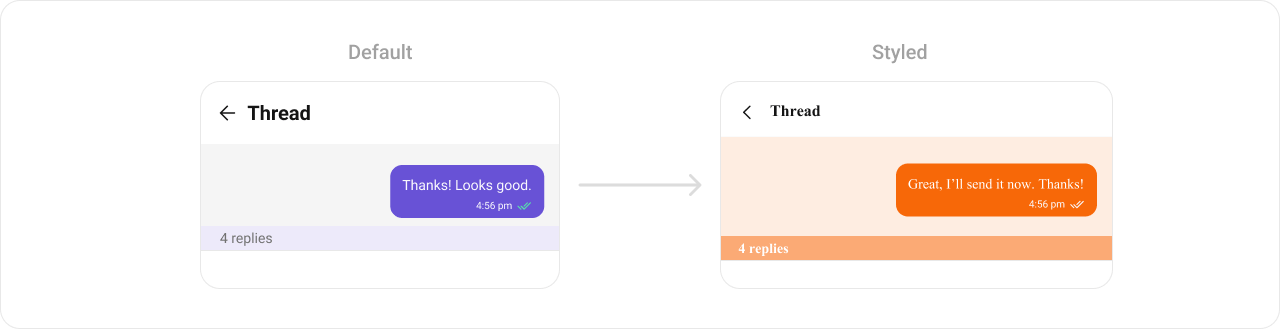 See [Component Styling](/ui-kit/android/component-styling) for the full reference.
***
## ViewModel
```kotlin lines theme={null}
val viewModel = ViewModelProvider(this)
.get(CometChatThreadHeaderViewModel::class.java)
```
```kotlin lines theme={null}
threadHeader.setViewModel(viewModel)
```
```kotlin lines theme={null}
CometChatThreadHeader(
parentMessage = baseMessage,
threadHeaderViewModel = viewModel
)
```
See [ViewModel & Data](/ui-kit/android/customization-viewmodel-data) for state observation and custom repositories.
***
## Next Steps
Display messages in a conversation
Display user/group info in the toolbar
Rich input for sending messages
Browse recent conversations
See [Component Styling](/ui-kit/android/component-styling) for the full reference.
***
## ViewModel
```kotlin lines theme={null}
val viewModel = ViewModelProvider(this)
.get(CometChatThreadHeaderViewModel::class.java)
```
```kotlin lines theme={null}
threadHeader.setViewModel(viewModel)
```
```kotlin lines theme={null}
CometChatThreadHeader(
parentMessage = baseMessage,
threadHeaderViewModel = viewModel
)
```
See [ViewModel & Data](/ui-kit/android/customization-viewmodel-data) for state observation and custom repositories.
***
## Next Steps
Display messages in a conversation
Display user/group info in the toolbar
Rich input for sending messages
Browse recent conversations