

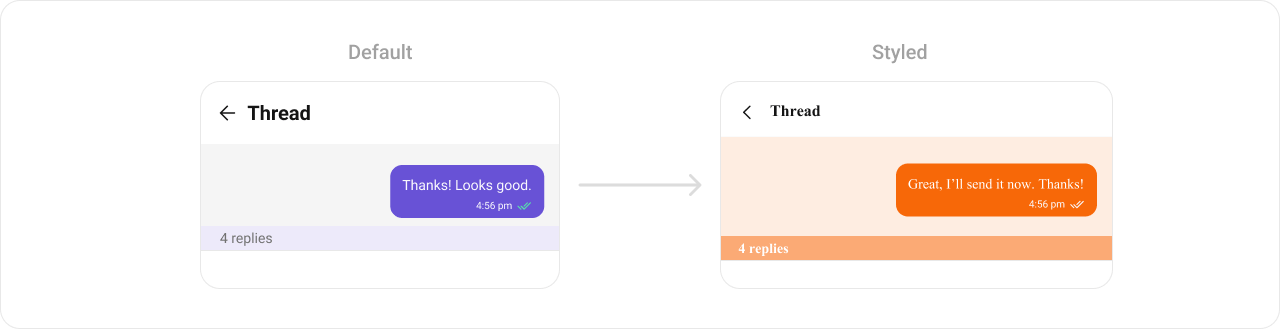
CometChatThreadHeader renders the parent message bubble and reply count for a threaded conversation. It requires a parent message to display.

Where It Fits
CometChatThreadHeader is a header component for threaded message views. Wire it above a CometChatMessageList and CometChatMessageComposer to build a complete threaded conversation layout.
- Kotlin (XML Views)
- Jetpack Compose
activity_thread.xml
Quick Start
- Kotlin (XML Views)
- Jetpack Compose
Add to your layout XML:Set the parent message — this is required:
CometChatUIKit.init(), a user logged in, and the UI Kit dependency added.
Actions and Events
Callback Methods
CometChatThreadHeader is a display-only header. It does not expose component-specific callbacks like setOnItemClick or setOnError. The one interactive element is the subscription bell (below), which reports state changes through its own callback.
Subscription Bell (onThreadSubscriptionChange / onSubscriptionToggle)
When thread subscription is enabled (UIKitSettings.setEnableThreadSubscription(true)), the header renders a subscription bell as a trailing control on the reply-count bar. It flips optimistically on tap, reverts with a toast on failure, and stays in sync with the message list’s Subscribe/Unsubscribe option automatically.
- Kotlin (XML Views)
- Jetpack Compose
app:cometchatThreadSubscriptionVisibility.SDK Events (Real-Time, Automatic)
The component listens to SDK events internally via its ViewModel. No manual setup needed.Functionality
Style
- Kotlin (XML Views)
- Jetpack Compose
Define a custom style in
themes.xml:themes.xml
ViewModel
- Kotlin (XML Views)
- Jetpack Compose
Next Steps
Message List
Display messages in a conversation
Message Header
Display user/group info in the toolbar
Message Composer
Rich input for sending messages
Conversations
Browse recent conversations